Streamer mode: play a game with your Twitch or Kick chat, right in the browser
In the Records streamer mode, your Twitch or Kick chat guesses the same world records as you by typing answers in chat. After every question you see the real answer, yours and the chat's: who got closer?
What the mode does
Records is our guessing game about world records: how fast a sprinter ran, how tall a skyscraper stands, how deep a lake goes. In streamer mode, your viewers vote in chat while you think it over on screen, and the game scores your guess against the chat's, round by round, over a 10 question game.
It all happens in a web page: open the Records streamer mode, pick Twitch or Kick, enter your channel name, connect and start.
What you need, and what you don't
You need a browser, your Twitch or Kick channel, and your usual streaming software to capture the game's window or tab. Nothing else.
- No install: the game runs in the browser.
- No account: no account on our site, no Twitch or Kick login, no developer account or app to register with them.
- No extension to add to your channel.
- No bot to invite into your chat: the game reads the messages itself.
- Free, like the rest of the game.
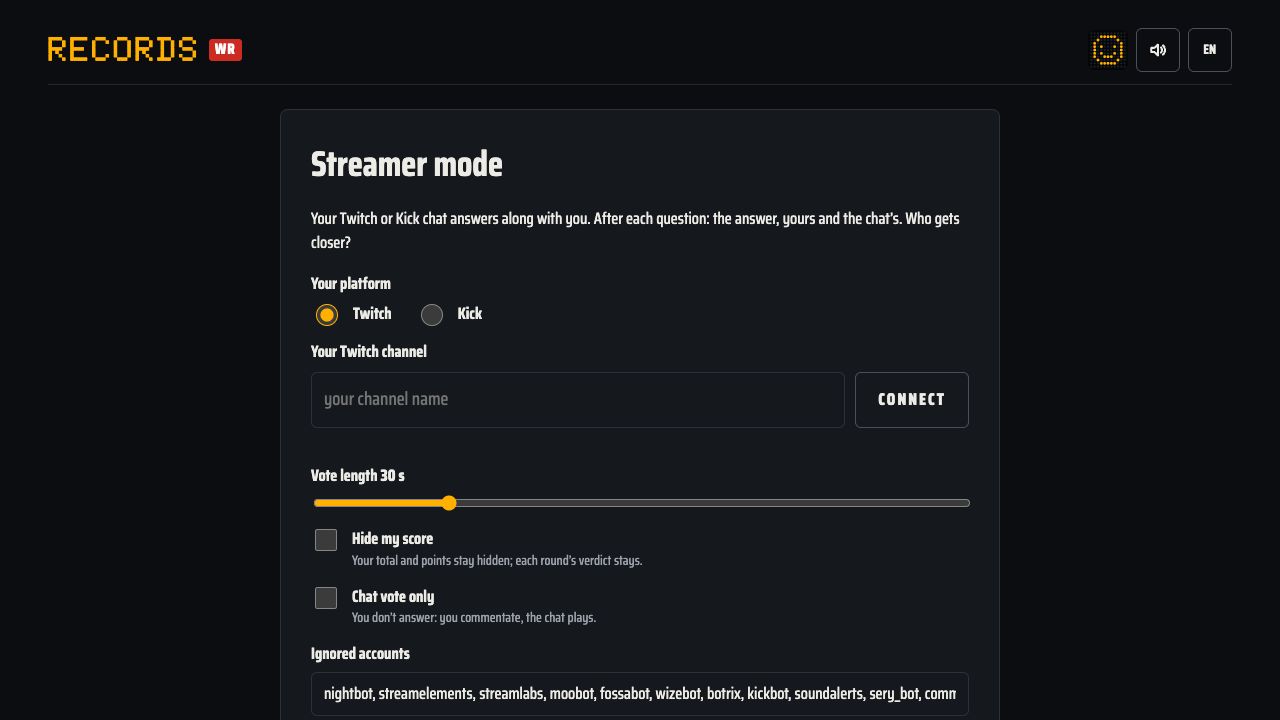
Starting a game, step by step
- Open streamer mode. You can also get there from the "Streamer mode" card on the game's home page.
- Under "Your platform", choose Twitch or Kick.
- Type your channel name in the "Your Twitch channel" (or "Your Kick channel") field: 3 to 25 characters, letters, digits or _ (Kick also accepts -). Your channel link works too.
- Click "Connect". Your browser reads your channel's chat anonymously, read-only.
- Set the vote length, and tick "Hide my score" or "Chat vote only" if you want them (more on both below).
- Check the ignored accounts: the common bots are already listed.
- Click "Start the game".
On Twitch, the chat is read anonymously, the way a logged-out viewer sees it. Kick offers no official way for a web page to read its chat, so the game reads it through the same public access as the kick.com site. If Kick changes that access, the connection may stop working until we update the game; the screen then says that Kick refuses the connection.
How a round plays out
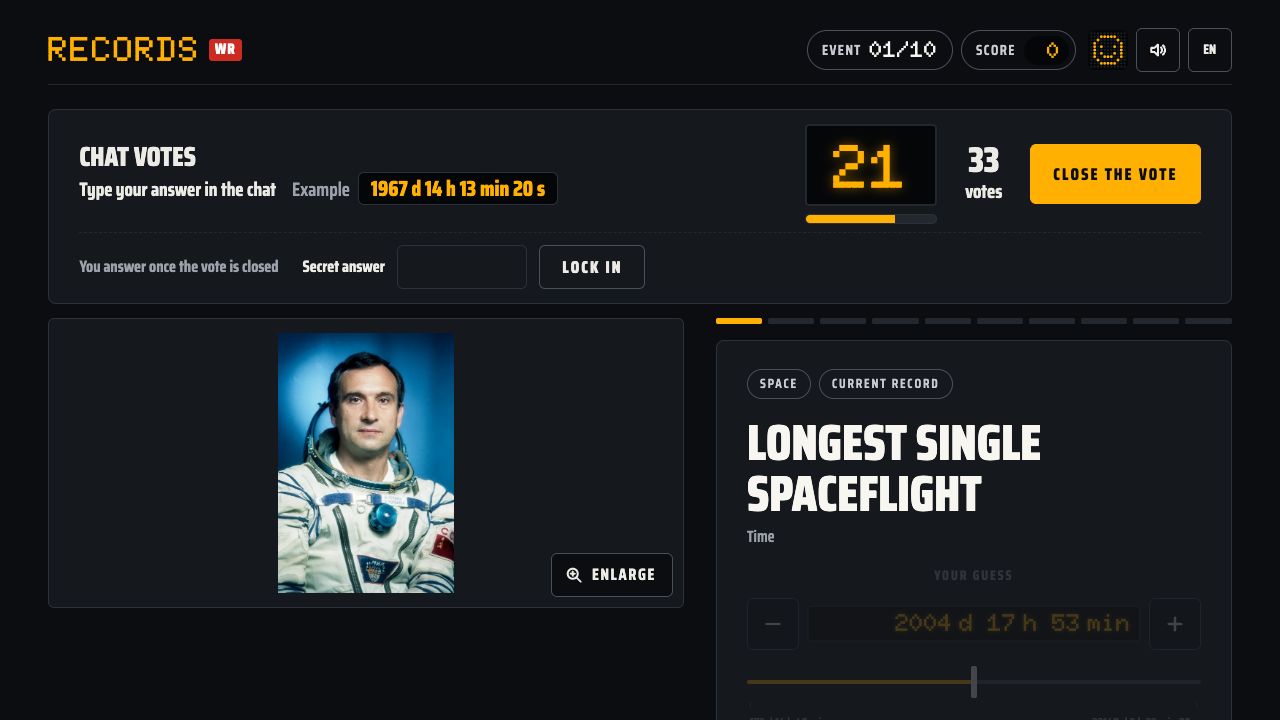
When a question comes up, a "Chat votes" banner appears at the top of the screen. It tells viewers what to do ("Type your answer in the chat"), shows an example answer, runs a countdown and counts the votes live. A "Close the vote" button lets you end the vote before time runs out.
What your viewers can type
The game reads most of the natural ways people write numbers, and ignores units:
- plain numbers: "9.5", "9,5", "1 200";
- shorthand: "1.2k", "1,5M", "2 millions";
- numbers with a unit: "76 kg", "4,50 €";
- durations: "3:43", "2h01", "3m43", "9.58 s";
- commands: "!r 9.5", "!v", "!vote", or just "!37";
- on a multiple choice question, the letter A to F or the exact name of the option.
Each viewer gets one vote. If someone sends several, only the last one counts, so changing your mind is allowed. Votes outside the slider's range are ignored, and votes that arrive after the close are counted as "too late".
Frozen controls and the secret answer
While the chat votes, your controls are frozen: if you moved the slider, chat would see your number on screen and could copy it. You can answer in two ways. Either wait for the vote to close and answer as usual, or type your number in the "Secret answer" field during the vote: the text is hidden on screen and your answer is submitted when the vote closes.
The reveal, explained
On a number question, the chat's answer is the median of the votes: the middle value once they are sorted. A few joke votes barely move it. On a multiple choice question, it is the option with the most votes.
Each question is worth up to 1,000 points, and a guess that is off by a factor of about 2 earns about half. You and the chat are scored the same way, and the reveal screen shows:
- the verdict: the chat wins, the streamer wins, or a tie;
- how many viewers voted;
- the best guesser, with their number and points (ties go to the closest, then the earliest);
- how many votes came in too late;
- a histogram of every vote, with the right answer, the chat's answer and yours drawn on it, each with its points.
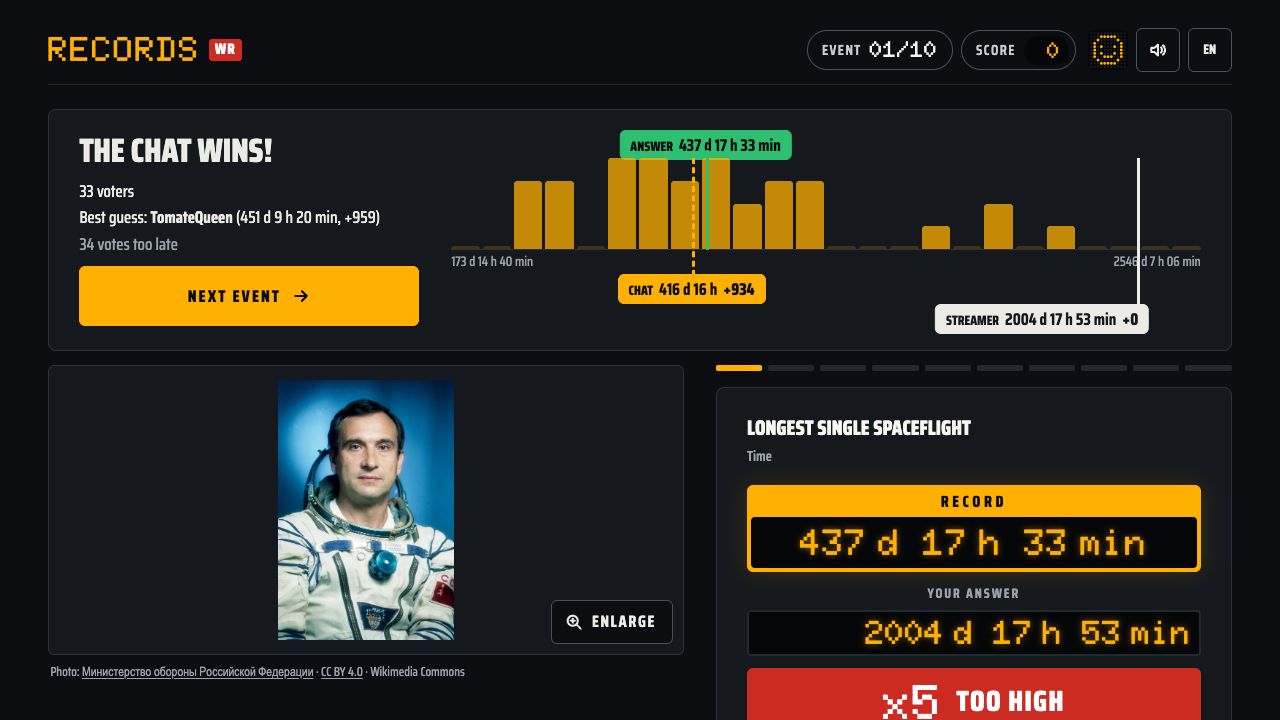
On the histogram, you see at a glance whether chat agreed or split, and who took a wild swing. Some records come down to hundredths of a second, like the 100 m in 9.58 s, others to hundreds of metres, like the tallest building in the world.
End of game and the top 5
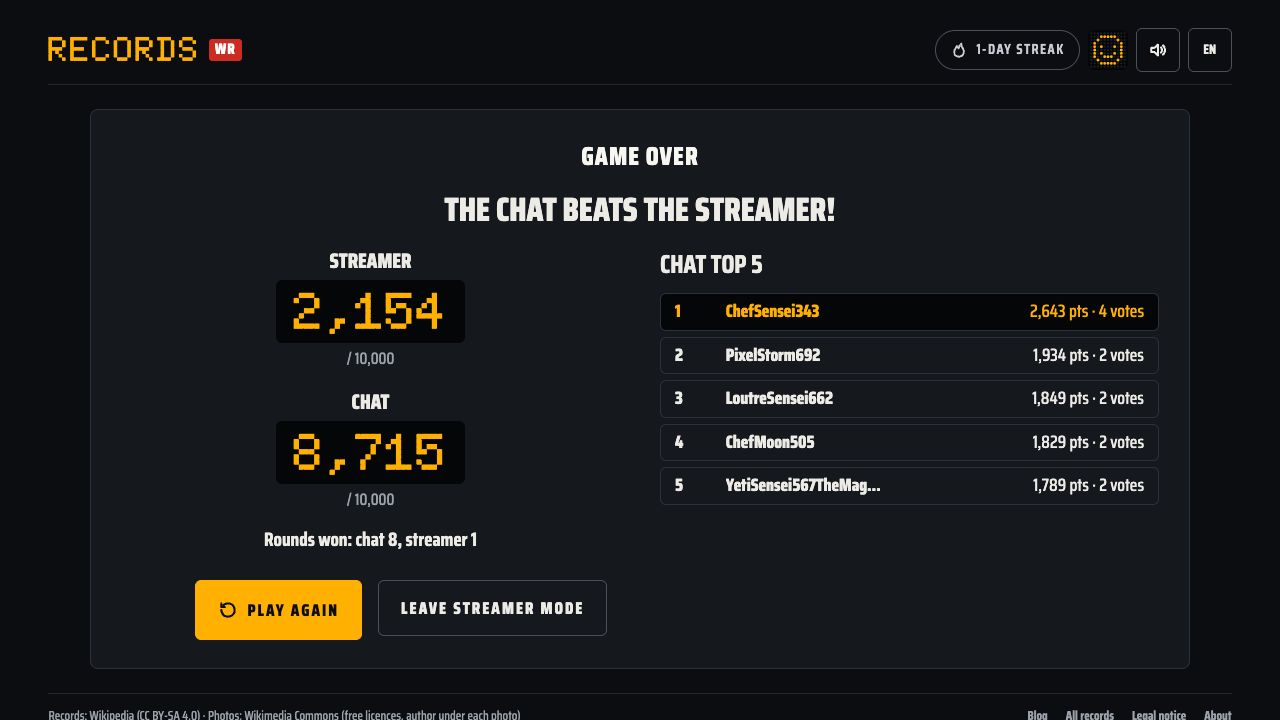
After 10 rounds, the end screen puts the chat's total against yours, with the number of rounds each side won. It also shows the chat's top 5: for each viewer, the points from the rounds they voted on are added up. Someone who skipped a round scores nothing on it, which rewards the viewers who stayed to the end.
If you reload the page mid-game, the game and the chat connection come back; a vote that was open starts over.
The settings and when to use them
Vote length (15 to 90 s, 30 s by default)
This is the one that matters most. Viewers see each question with your stream delay, then still need to type: if the vote is too short, some answers land after the close. With a small chat, a longer vote gives everyone time to join in; with a fast chat, 30 s is often enough and keeps the pace up.
Hide my score
Your total and points stay hidden, while each round's verdict still shows. Handy if you would rather the game be about your chat than about your score.
Chat vote only
You don't answer: you commentate while the chat plays. Good for hosting without competing. A game played this way does not count towards your records or stats.
Ignored accounts
Messages from these accounts are never counted as votes. The list already holds the usual bots: Nightbot, StreamElements, Streamlabs, Moobot, Fossabot, WizeBot, BotRix, KickBot, SoundAlerts, Sery_Bot and CommanderRoot. Add your own bot, separated by a comma, if it posts numbers in chat.
Try it alone with a simulated chat
Before going live, you can test the mode off stream with the simulated chat: fake viewers vote on every question. Two sliders that only exist in the simulation set how many there are and their average stream delay. They are not settings of the real mode, but they show how late votes pile up depending on the vote length you pick.
Privacy: nothing goes through our servers
- Your browser connects to your Twitch or Kick chat itself and reads it read-only, anonymously: the game never posts anything and has no access to any account.
- Nicknames and votes stay in your browser: nothing goes through our servers.
- Nothing is stored: not the list of voters, not their answers.
The same mode in our two other games
We also make Nutri and Price, with the same streamer mode: same setup, same chat versus streamer duel.
- Nutri: your chat guesses the Nutri-Score of food products.
- Price: your chat guesses the price of supermarket products.
Records and its streamer mode are available in 10 languages: French, English, Spanish, German, Italian, Portuguese, Dutch, Polish, Turkish and Indonesian.
Tips for your stream
- Match the vote length to your stream delay. If the too late count keeps climbing every round, make the vote longer.
- Tell chat the format up front. A plain number is enough and units are ignored, so fewer messages get lost.
- Use the secret answer when you want to think out loud without giving hints: your number stays hidden until the close.
- Don't say your answer before the close. Your slider is frozen for that reason, but your voice isn't.
- Remind viewers they can change their mind: only each viewer's last vote counts.
- Add your own bots to the ignored accounts before you start.
- Small chat? Make the vote longer so everyone has time to vote.
- Test with the simulated chat first to tune the vote length off air.